Stop chasing your crew.

Scheduling, crew dispatch, and alerts for cleaning businesses and trades, built by a cleaner with six years in the field. You pay one flat monthly rate, with no per-job or per-seat fees.

Try the Live Demo Message Us

Sound familiar?

๐Ÿ“ฑ
Group texts that never end
You're texting 6 people to find out who's available for a 10am checkout. Half don't respond.
๐Ÿ˜ค
No-shows with no warning
You find out a cleaner didn't start when the guest texts you asking why the house isn't ready.
๐Ÿ’ธ
Paying for software you barely use
You're paying Jobber or Turno for features you never open, when you just need scheduling and dispatch.
๐Ÿ“‹
Spreadsheets that don't talk to anything
Your schedule is in one place, your pay rates in another, your issue reports in texts you'll never find again.

What you get

Everything runs automatically. You set it up once.

๐Ÿ“…

Automatic scheduling

Turnovers come straight from your booking calendar for every property, so nobody types them in.

๐Ÿ‘ฅ

Crew assignment

Assign cleaners by property. Sub-assign to crew leads who manage their own teams. Everyone sees only their jobs.

๐Ÿ””

Four automatic alerts

New job assigned, not started on time, not finished on time, and issue reported. Each alert goes to the people who need it.

๐Ÿ“Š

Live dashboard

See today's turnovers, who's working, and what's done or late, on your phone or desktop, without logging in.

โš ๏ธ

Issue reports with photos

Cleaners report problems with one tap and attach photos, and you see the report right away.

๐Ÿ’ฐ

Pay tracking

Set rates per property, per cleaner, or per job, and see what you earn and what you pay out in the same place.

๐Ÿ“ฑ

Phone widget

Crews on Android get a home screen widget showing today's jobs with one-tap Start, Finish, and Issue buttons, with no app to download.

๐Ÿ”—

Chain assignment

You give it to Maria. Maria gives it to Tasha. Each person sees only what they need. Pricing stays private at every level.

See it in action

Real screens from the working system.
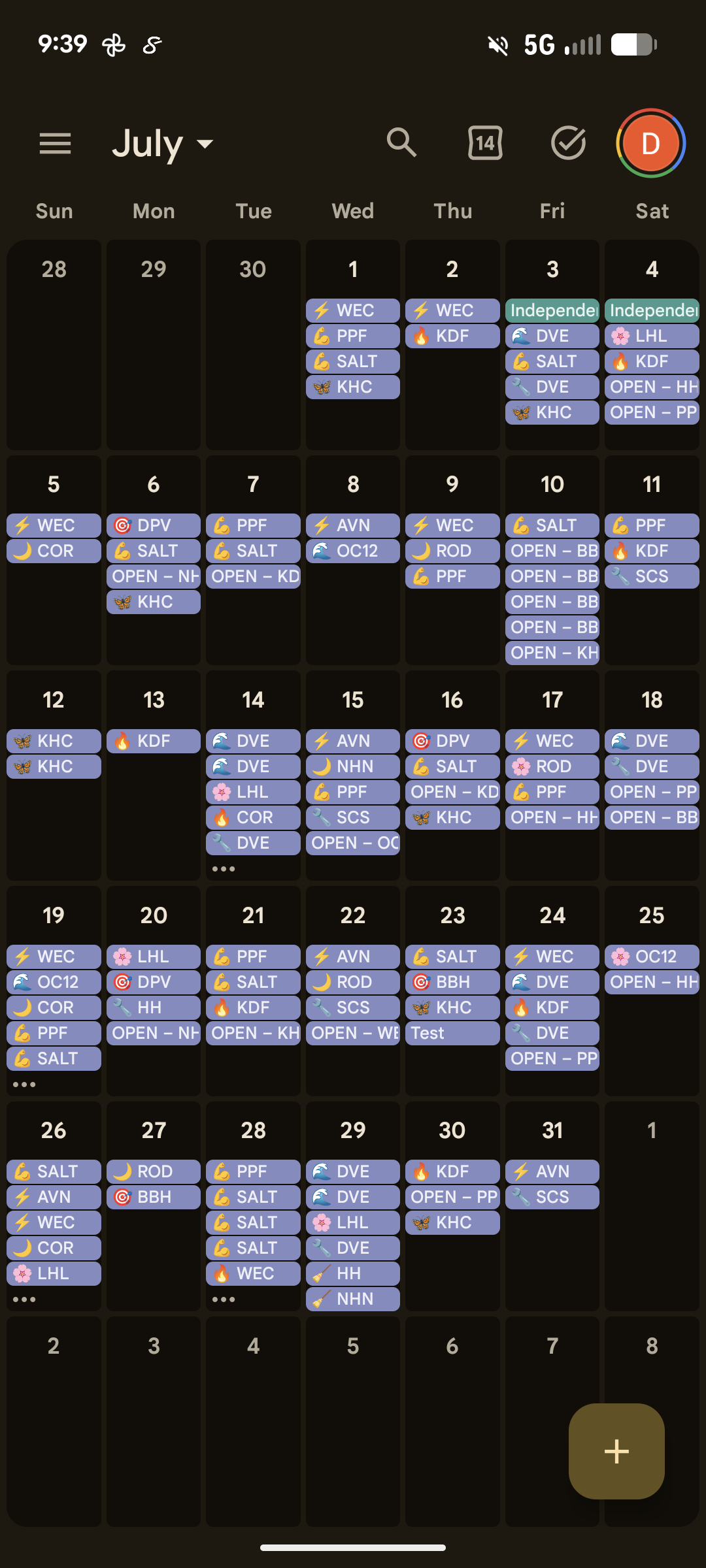
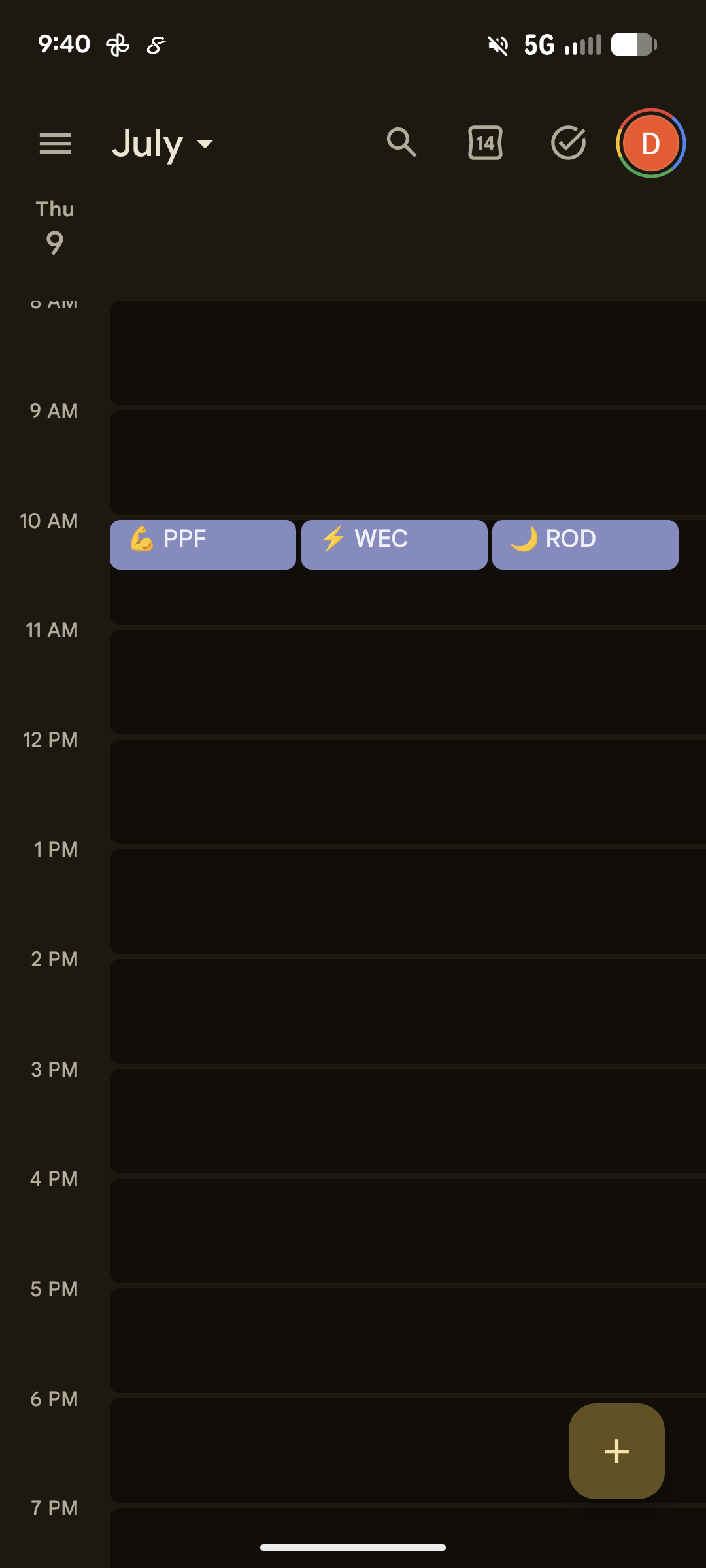
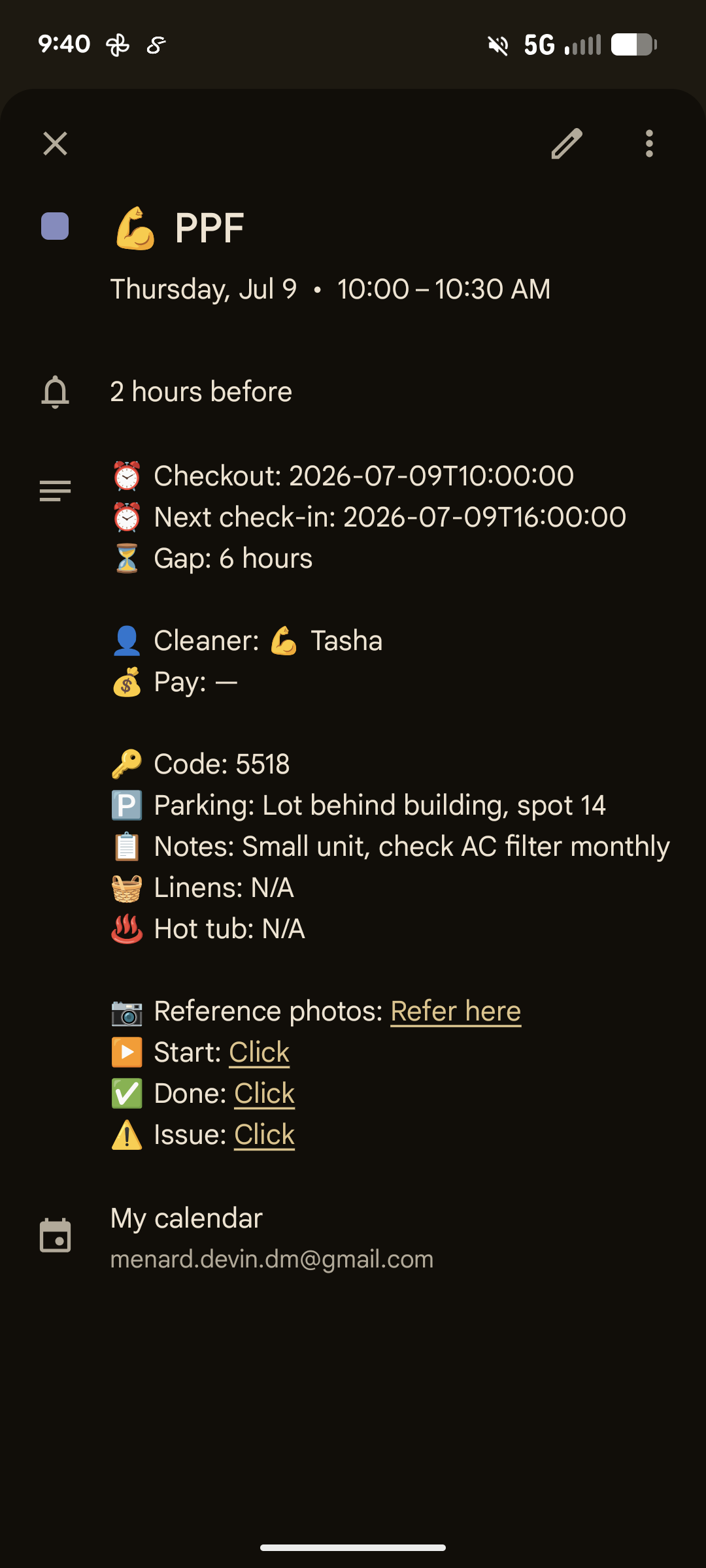
Google Calendar month view Google Calendar day view Job detail card
๐Ÿ“ฑ What your cleaners see
Every turnover lands on Google Calendar with the property code, checkout time, lockbox code, parking, notes, and one-tap Start, Done, and Issue buttons. Your crew doesn't install an app or remember a login.
Dashboard preview
๐Ÿ“Š Live dashboard
Every turnover, who's assigned, and what's done or late, plus revenue, cleaner workload, issue reports, and properties in one place. It carries your logo and colors.
๐Ÿ”— Chain assignment
You assign to Maria, and Maria assigns to Tasha. Each person sees only the jobs below them, and pay rates stay private at every step. If someone can't make it, the job is re-assigned through the chain instead of a group text.
๐Ÿ”” 4 automatic alerts
Alerts go out when a new job is booked, when a cleaner hasn't started 30 minutes after checkout, when a cleaner hasn't finished 10 minutes before check-in, and when an issue is reported. Each one goes to the people who need it.
โš ๏ธ Issue reporting with proof
When a cleaner finds a broken window, they tap Issue and attach a photo. You get the photo, the property, and the time it was reported, so nobody has to ask for the picture again.

Built on real tools

It runs on Google Calendar and other standard tools, so there's no custom app and your data isn't locked in.

๐Ÿ“ฑ Android

Google Calendar Job cards + scheduling
KWGT Widget Home screen job slots
MacroDroid One-tap action buttons
ntfy Push notifications

๐ŸŽ iPhone (planned)

Google Calendar Job cards + scheduling
WidgetKit Home screen job slots
App Intents One-tap action buttons
ntfy Push notifications
Backend: n8n ยท Airtable ยท PostgreSQL ยท Caddy ยท Cloudflare

How it works

1

We connect your calendar

Your Airbnb, VRBO, or direct booking calendar feeds into the system. New reservations create turnovers automatically.

2

We set up your crew

Add your cleaners, assign them to properties, and set their pay rates. Setup takes 30 minutes for your whole operation.

3

It runs itself

Jobs assign themselves and cleaners get notified. If someone's late or reports a problem, you hear about it. Otherwise you don't have to check.

Pricing

There are no setup fees, contracts, or per-clean charges, and you can cancel anytime.

Solo
$50/mo
Up to 5 properties
  • Auto-scheduling
  • Crew assignment
  • Live dashboard
  • Issue reporting
  • Pay tracking
Small
$100/mo
Up to 10 properties
  • Everything in Solo
  • 4 automatic alerts
  • Chain assignment
  • Phone widget (free tier)
  • Photo proof reports
Growing
$150/mo
Up to 15 properties
  • Everything in Small
  • Per-cleaner rate overrides
  • Standing chain templates
  • Job archiving
  • Priority support

16โ€“25 properties: $15/door ยท 26+ properties: $18/door

Add-ons

Custom Widget $25โ€“50/cleaner
Fairness Auto-Assignment $25/mo
Settlement Tracking $25/mo
Smart-Lock Integration $25/mo
Guest Guidebook $25/mo
Inventory Lists $25/mo
Extra Chain Hop $25/mo

AI add-ons

AI Photo Analysis $50/mo
AI Issue Categorization $50/mo
AI Completion Summaries $50/mo
AI FAQ Chatbot $50/mo
Usage Analytics $50/mo

How we compare

UsTurnoJobber
Monthly (10 props)$100$100 ($80 billed yearly)$199 for Connect, 5 users ($149 billed yearly)
Per-clean feeNone0–3.9% if you pay cleaners through TurnoNone
Per-seat chargeNoneNone$29/mo per user over the plan
Alert if a cleaner hasn't started on timeโœ“ Built inNot documentedNot documented
Crew leads re-assign jobs to their own cleanersโœ“ Built inThrough the Taskbird appNot built in
Photo proof reportsโœ“ Includedโœ“ IncludedConnect plan and up
Home screen job widgetโœ“ Android, 3 tiersNot documentedNot documented
Setup fee$0$0$0

Competitor prices and features checked October 2, 2026 at turno.com/pricing, getjobber.com/pricing, and their help centers. Prices change, so check their sites for current rates. The comparison assumes 10 properties and your own crew of 4 to 5 people.

Ready to stop chasing?

I built this after six years of turnovers and the same problems you have.

Try the Live Demo DM on Facebook